
Find the Location of a Lost Phone Using Reverse Lookup

By Razib Mojumder
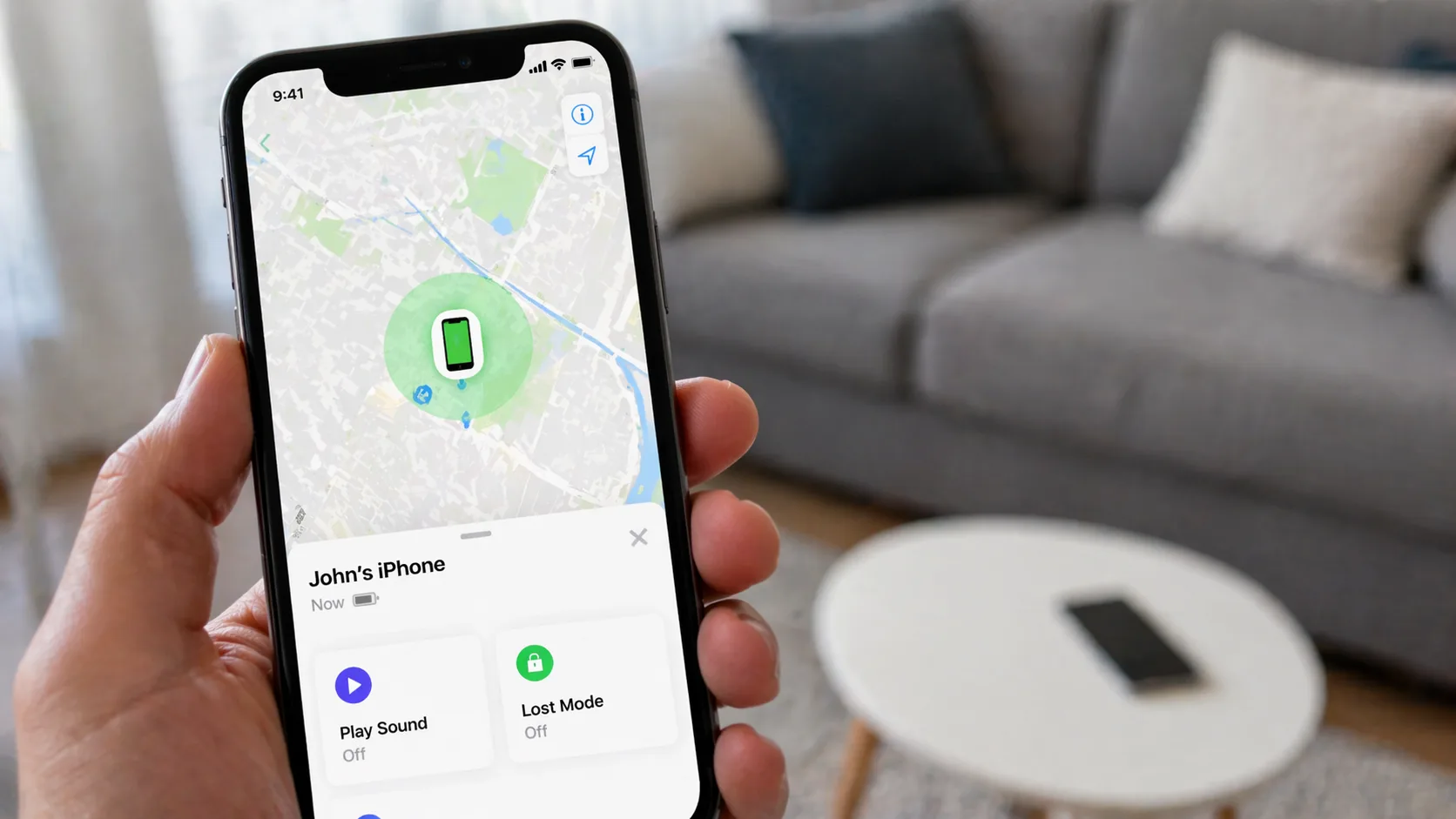
You just realized your phone is missing. That sinking feeling hits—where did you leave it? Or maybe someone’s been calling from an unknown number, and you need to know who and where they are. Reverse phone lookup isn’t just for finding out who called you; it’s become a practical tool for locating lost devices and tracking down phone numbers to their physical locations.
Here’s what most people don’t realize: your phone constantly communicates with cell towers, GPS satellites, and WiFi networks. When you combine this data with reverse lookup technology, you can narrow down a phone’s location with surprising accuracy—sometimes within a few meters.
Understanding How Reverse Phone Lookup Works
Reverse phone lookup flips traditional phone directory searches on their head. Instead of searching by name to find a number, you input a phone number to discover the owner’s details, location data, and carrier information.
The technology pulls from multiple databases:
- Public records: Government databases, property records, court documents
- Telecom databases: Carrier information, number registration data
- User-submitted data: Community-sourced information from apps and services
- Location databases: GPS coordinates, cell tower triangulation data
Modern reverse lookup services like NumLocate aggregate this information in real-time, giving you instant access to location data tied to any phone number.
Reverse phone lookup is completely legal when used for legitimate purposes like finding your own lost device, identifying unknown callers, or verifying business contacts. Using it to stalk, harass, or invade someone’s privacy is illegal in most jurisdictions.
Step-by-Step: Finding Your Lost Phone’s Location
Step 1: Gather Your Phone Number Details
You’ll need your complete phone number including area code. If you’re tracking someone else’s phone (with permission), get their full number as well.
Write down:
- The 10-digit phone number
- Your carrier (Verizon, AT&T, T-Mobile, etc.)
- When you last had the phone
- The general area where you might have lost it
Step 2: Choose a Reliable Reverse Lookup Service
Not all reverse lookup tools are created equal. You want one that offers real-time location tracking, not just old address records.
Key features to look for:
- Real-time GPS tracking capabilities
- Cell tower triangulation
- Historical location data
- Carrier information
- Multiple search attempts (some services limit free searches)
Step 3: Enter the Phone Number
Head to your chosen reverse lookup service. Most have a simple search bar front and center.
Enter the phone number in this format: (XXX) XXX-XXXX or XXX-XXX-XXXX. Some services accept international formats if you’re tracking a phone abroad.
Hit search and wait 10-30 seconds while the system queries multiple databases.
Step 4: Analyze the Location Results
Your search results typically include:
Current Location Data:
- GPS coordinates (latitude/longitude)
- Street address or nearest landmark
- City, state, and ZIP code
- Accuracy radius (usually 10-500 meters)
Historical Data:
- Previous locations where the phone pinged
- Movement patterns over the last 24-48 hours
- Frequently visited locations
Device Information:
- Carrier network
- Phone model (if available)
- Registration details
Step 5: Map Out the Location
Most services display results on an interactive map. You can:
- Zoom in to street level
- Switch between map and satellite view
- Get turn-by-turn directions to the location
- See nearby businesses or landmarks
If your phone is at a large building like a mall or office complex, the accuracy radius helps you narrow down which section to search.
Step 6: Take Action to Recover Your Device
Once you’ve pinpointed the location:
If it’s nearby: Head there immediately. The phone might still be where you left it.
If it’s at someone’s home or business: Call the location first. Many times, Good Samaritans find phones and wait for the owner to call.
If it’s moving: Someone may have picked it up. Consider these options:
- Call your phone (they might answer)
- Use your carrier’s tracking service as backup
- Contact local police if you suspect theft
If it’s at your home: Check between couch cushions, in jacket pockets, or under car seats—the usual suspects.
Comparing Top Reverse Lookup Services for Location Finding
| Service | Location Accuracy | Real-Time Tracking | Free Searches | Best Feature |
|---|---|---|---|---|
| NumLocate | 10-50 meters | Yes | 3 per day | Live GPS tracking |
| TrueCaller | 50-200 meters | Limited | 1 per day | Spam identification |
| Spokeo | 100-500 meters | No | None | Historical records |
| BeenVerified | 200-1000 meters | No | None | Background checks |
| Intelius | 100-500 meters | Limited | None | Comprehensive reports |
Advanced Techniques for Better Location Results
Cross-Reference Multiple Services
Using two or three reverse lookup tools simultaneously gives you more accurate results. If NumLocate shows your phone at 123 Main Street and another service confirms the same location, you’ve got a solid lead.
Check Social Media Location Tags
If you’re tracking a phone that’s been posting on social media, check recent location tags. Instagram, Facebook, and Twitter posts often include GPS coordinates that can confirm reverse lookup data.
Use Cell Tower Data Strategically
Cell tower triangulation becomes more accurate in urban areas with dense tower coverage. In rural areas, expect a larger accuracy radius—sometimes up to a mile. Factor this into your search strategy.
Monitor Movement Patterns
If the phone is on the move, refresh your search every 5-10 minutes. You can track its route and predict where it’s headed. This works especially well if someone’s driving your phone to a specific destination.
What to Do When Reverse Lookup Doesn’t Work
Sometimes you’ll hit dead ends. Here’s why and what to do:
The phone is powered off: GPS and cell signals stop. Your last known location is your best bet. Check there first.
The SIM card was removed: This breaks the connection between the number and the device. Try your carrier’s IMEI tracking instead.
It’s an old burner phone: Prepaid phones with minimal registration data won’t show up in most databases.
Privacy settings block tracking: Some phones have enhanced privacy features that limit location sharing.
Backup options:
- Contact your carrier directly—they have more robust tracking
- File a police report if you suspect theft
- Use manufacturer tracking (Find My iPhone, Find My Device)
- Check your phone’s last backup for location history
Pros:
- Works on any phone number, not just smartphones
- No apps required on the lost device
- Access to historical location data
- Can identify unknown callers simultaneously
- Legal and privacy-compliant for legitimate uses
Cons:
- Accuracy varies based on area and cell coverage
- May require paid subscription for unlimited searches
- Won’t work if phone is completely powered down
- Less effective on prepaid/burner phones
- Some services provide outdated information
Privacy Considerations You Should Know
Reverse phone lookup walks a fine line between useful tool and privacy invasion. Here’s what’s legal and ethical:
Legal uses:
- Finding your own lost phone
- Tracking family members’ phones (with consent)
- Identifying spam or scam callers
- Verifying business contacts
- Locating phones you own for your business
Illegal uses:
- Stalking or harassing someone
- Tracking someone without their knowledge or consent
- Using location data for discrimination
- Selling someone’s location information
- Corporate espionage
Most legitimate reverse lookup services require you to agree to terms that prohibit illegal use. Violating these can result in account termination and potential legal consequences.
Mobile vs. Landline: Different Location Strategies
Reverse lookup works differently depending on phone type:
Mobile phones provide:
- GPS coordinates
- Cell tower triangulation
- Real-time movement tracking
- WiFi network connections
- Accuracy: 10-500 meters
Landlines provide:
- Registered service address
- Exchange location
- Provider information
- Accuracy: Exact address (but phone is stationary)
For landlines, the “location” is always the installation address. This makes them easier to locate but offers no tracking capability if someone’s making calls from a mobile device using a landline number (VoIP).
Preventing Future Phone Loss
Once you’ve found your phone, take these steps to make future searches easier:
- Enable manufacturer tracking: Turn on Find My iPhone or Find My Device before you lose it again
- Set up location sharing: Share your location with a trusted friend or family member
- Register your number: Keep your carrier information updated with current addresses
- Use tracking apps: Install third-party tracking apps as backup
- Document your IMEI: Write down your phone’s IMEI number (dial *#06#) and keep it somewhere safe
When to Involve Law Enforcement
If your reverse lookup reveals your phone is:
- In a high-crime area
- Moving rapidly or erratically
- At a pawn shop or known theft resale location
- In someone’s home who refuses to return it
Contact police instead of confronting the situation yourself. Provide them with:
- Your phone number and IMEI
- The reverse lookup location results
- Screenshots of the tracking data
- Your proof of ownership (receipt, carrier account)
Police can legally access more detailed tracking data and safely recover your device.
Can I track a phone’s location without the owner knowing?
This depends on your relationship with the phone owner and local laws. Parents can legally track their minor children’s phones. You can track phones you own for your business. However, tracking an adult’s phone without their knowledge or consent is illegal in most places and could result in stalking or harassment charges. Always get permission first unless you’re tracking your own device.
How accurate is reverse phone lookup for finding lost phones?
Accuracy ranges from 10 meters to 1 kilometer depending on several factors: urban vs. rural location, cell tower density, GPS signal strength, and the quality of the lookup service. Urban areas with dense cell coverage typically provide accuracy within 10-50 meters. Rural areas might only narrow it down to a few blocks or a general neighborhood. Services like NumLocate that use GPS and cell tower triangulation offer the best accuracy.
Will reverse lookup work if someone changed the SIM card in my phone?
Partially. If someone swaps the SIM card, the phone number changes, but the device’s IMEI remains the same. Standard reverse phone lookup won’t find the new number, but you can contact your carrier with the IMEI to track the device itself. Some advanced services can track IMEI numbers directly, though this typically requires law enforcement involvement for privacy reasons.
How much does it cost to use reverse lookup for location tracking?
Costs vary widely. Basic services like NumLocate offer 1-3 free searches per day, with premium plans ranging from $9.99-$29.99 monthly for unlimited searches and real-time tracking. One-time search fees run $2-$5 per lookup. For finding a lost phone once, free services usually suffice. If you need ongoing tracking or multiple searches, monthly subscriptions offer better value.
Can reverse lookup find phones that are turned off?
No. When a phone is powered off, it stops communicating with cell towers and GPS satellites, making real-time tracking impossible. However, reverse lookup services can show the last known location before the phone died or was turned off. This historical data helps you retrace your steps. Once the phone powers back on, it will ping the network again and update its location.
International Phone Tracking Considerations
Tracking phones across borders adds complexity:
Different number formats: International numbers need country codes (+1 for US, +44 for UK, etc.)
Data privacy laws: Europe’s GDPR, California’s CCPA, and other regulations limit what location data services can share
Carrier cooperation: Not all international carriers share real-time location data with third-party services
Roaming complications: Phones roaming internationally might show their home country location in some databases
For international tracking, use services that specifically support global lookups and understand local privacy regulations.
Reverse Lookup for Identifying Suspicious Callers
Beyond finding lost phones, reverse lookup helps identify who’s calling:
Spam and scam calls often originate from specific area codes (232, 268, 473 are common scam prefixes). Running these through reverse lookup reveals:
- The actual location of the caller
- Whether it’s a VoIP or spoofed number
- Reports from other users about the number
- Associated scam patterns
This information helps you decide whether to answer, block, or report the number to authorities.
The technology behind reverse phone lookup has evolved dramatically. What started as simple directory lookups now combines GPS data, cell tower triangulation, public records, and user-submitted information to create a powerful tool for finding lost phones and identifying unknown callers. Whether you’ve misplaced your device at a coffee shop or need to track down a suspicious number, these services put location intelligence at your fingertips.
Editorial Standards & Fact Checking
At NumLocate, our telecommunications and privacy guides are independently researched, cross-referenced with official FCC guidelines and carrier numbering plans, and reviewed to ensure consumer safety and accuracy.

Written by Razib Mojumder
Telecommunications & Digital Privacy Specialist
Razib is the lead researcher at NumLocate, specializing in caller ID authentication protocols, STIR/SHAKEN anti-spoofing frameworks, and practical digital privacy tools for everyday consumers.
Related Articles
 How To
How to Fix Your Phone Number Being Marked as Spam
TL;DR If your phone number is marked as spam, you can fix it by requesting removal from major spam databases like the First Orion Scam Call Registry and registering with the National Do Not Call Registry, contacting your carrier to clear your number’s reputation, reducing your call volume and improving call patterns to avoid spam […]
 How To
How to Remove Your Phone Number From Google Search
TL;DR To remove your phone number from Google search results, start by deleting the source content where your number appears, then submit removal requests through Google’s Removals Tool for specific URLs. You can also contact website owners directly to remove your information, request de-indexing for sensitive personal data, and adjust privacy settings on social media […]
 How To
How to Report Scam Calls and Robocalls
TL;DR Report scam calls to the Federal Trade Commission through their online complaint form or by phone at 1-877-382-4357, and forward robocalls to 7726 (SPAM) to help your carrier identify and block fraudulent numbers. You should also report violations to the Federal Communications Commission, your state attorney general, and consider registering your number on the […]